
Liam Stanley
Published 4 years ago
Recently I started working on a new terminal UI tool for Concourse CI, called hangar-ui. Here is one of my initial sketches of what I wanted it to look like:

Hangar UI Sketch
I came across BubbleTea a few months ago, and it got me excited about the idea of making terminal UIs again. I've made multiple full-viewport TUIs in the past, primarily for company-internal APIs and tools, to make engineering workflows quicker -- however, each time I've done this, I've realized that making UIs that work for the terminal is often awkward or difficult.
The struggle
For most languages, there are usually libraries that provide the functionality required to build a UI. However, the functionality of those libraries is can vary from two different sides of the spectrum. Either these libraries force you to use specific models/views/keybinds/etc, or you're left with the complete opposite, where a library gives you the minimum required features, and you have to implement all of the logic yourself. With so much of the architecture and logic being left up to the user, it's hard to properly architect the UI to be extensible, event-driven, non-blocking, etc.
BubbleTea is awesome
In comes BubbleTea, swinging with the full force of the Go ecosystem, along with some useful helper libraries: lipgloss, bubbles, and harmonica. These libraries alone create a rich set of features allowing you to get 90% of the functionality you might need for a terminal UI or giving you the tools required to do so, with great documentation and examples. BubbleTea doesn't hold your hand, but it does give you some recommendations and best practices that ensure you don't dig yourself into a hole.

Bubble Tea Example
You can find some awesome applications built on top of BubbleTea here. Some examples:
- knipferrc -- Terminal-based file manager
- dlvhdr/gh-dash -- CLI dashboard for GitHub
- ajeetdsouza/clidle -- Play Wordle over SSH
- charmbracelet/glow -- Render markdown on the CLI, with pizzazz
Ok, but why the blog post?
I'm glad you asked! When I started to implement hangar-ui, the first hurdle I ran into was related to adding mouse support. BubbleTea exposes an event that you can listen to when mouse support is enabled. The event in question lets you know the coordinates of the mouse event, along with the type (left/right click, up/down scroll, etc). This was super easy to enable and start taking advantage of. Here is a snippet of some of the previous logic that I was using to calculate what child component/model was clicked, thus which one should receive keyboard input, and which one to visibly mark as "active":
 1    // [...]
 2    switch msg.Type {
 3    case tea.MouseWheelUp, tea.MouseWheelDown:
 4        _, cmd = a.views[a.active].Update(msg)
 5        return a, cmd
 6    default:
 7        // Check to see if the mouse is over the commandbar, or statusbar.
 8
 9        if msg.Y < a.commandbar.Height {
10            _, cmd = a.commandbar.Update(msg)
11            return a, cmd
12        }
13
14        if msg.Y < a.commandbar.Height+a.navbar.Height {
15            _, cmd = a.navbar.Update(msg)
16            return a, cmd
17        }
18
19        if msg.Y >= a.height-a.statusbar.Height {
20            _, cmd = a.statusbar.Update(msg)
21            return a, cmd
22        }
23
24        minYBounds := a.commandbar.Height
25        maxYBounds := a.height - a.statusbar.Height - 1
26        minXBounds := 0
27        maxXBounds := a.width - 1
28
29        if msg.Y >= minYBounds && msg.Y <= maxYBounds && msg.X >= minXBounds && msg.X <= maxXBounds {
30            // Don't propagate mouse events to anything but the active view.
31            msg.X -= minXBounds
32            msg.Y -= minYBounds
33            _, cmd = a.views[a.active].Update(msg)
34            return a, cmd
35        }
36
37        return a, nil
38    }
39    // [...]
Initially looking at the logic, it seems pretty straightforward. The root app keeps track of the child components, has access to the height/width of those components, and can easily calculate if the mouse event was in the bounds of each component. However... as soon as I started to add additional components, inside of the existing child components, for example:
app root > active viewport > table > table rows > etc
It became clear that the app root can't realistically keep track of that information in a sane way. The alternative is to separate the state and have each child component handle its logic -- the problem is when it comes to mouse events, everything is relative to the coordinates of the viewport. It's critical to understand the offset where the individual component is rendered, and that means any component parent has to still calculate each child component offset, and keep it updated when any changes occur.
That sounds like a lot of work. 😅
BubbleZone
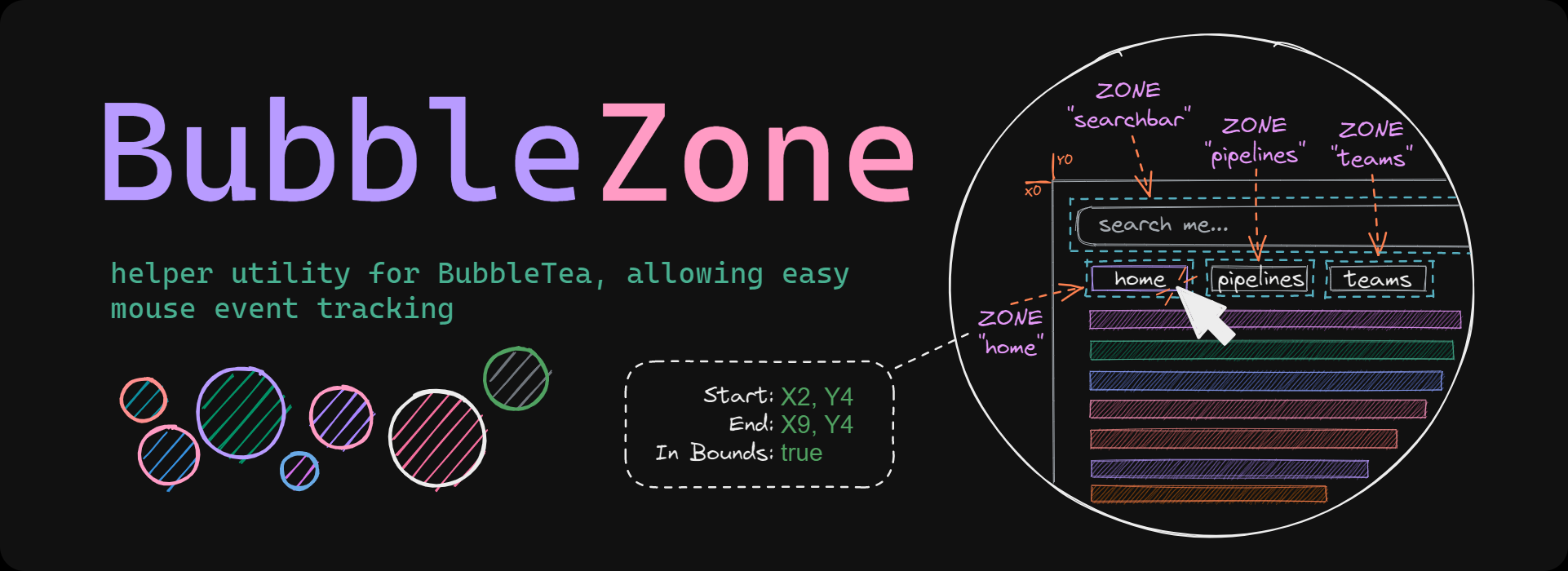
I started to brainstorm solutions to this problem, and what I've settled on is BubbleZone. BubbleZone can be used to set unique markers to designate zones (or regions) in the output of each component (using zone.Mark(<id>, <view-output>)). At the application root view, BubbleZone uses a zone manager to scan/parse the resulting output (zone.Scan(<view-outptu>)), finding all of the markers and calculating their offset, subsequently trimming them from the output before handing that output to Bubble Tea.
Because the zone manager then stores this information, it can be queried later. For example, when a mouse event is received, we can call zone.Get(<id>).InBounds(mouseEvent), and BubbleZone will tell us if that mouse event was within the bounds of the zone. Awesome right? You no longer have to do your own calculations for offsets, and if you want relative offsets for calculating where to move things like cursors inside of a zone, BubbleZone provides that option via x, y := zone.Get(<id>).Pos().
- Project link: https://github.com/lrstanley/bubblezone
Examples
Take a look at some of these examples that I put together that take inspiration from the awesome lipgloss and bubbles examples, but also include the use of BubbleZone for that spicy mouse event support.

List example

Lipgloss example